
Tech Playbook: Litigation Workflows with Claude Cowork #
Most AI tools for lawyers are chatbots with legal branding. You paste in a document, type a question, get an answer. Useful, but limited to one exchange at a time — and every session starts from zero.
Agentic AI works differently. Instead of answering a single prompt, an agentic system takes a goal, breaks it into steps, executes them autonomously, and delivers finished work product. It reads your files, writes documents, builds spreadsheets, recovers from errors, and coordinates parallel tasks — all without you managing each step. The shift from “answer my question” to “complete this project” is the difference that matters.
Claude Cowork is Anthropic’s agentic AI for knowledge work. It launched in January 2026, went generally available on macOS and Windows in April, and is now available on all paid plans. It runs inside the Claude Desktop app — you point it at a folder on your computer, describe what you need in plain English, and it executes. Code runs inside a sandboxed virtual machine with access only to the folders and network destinations you’ve approved, enforced at the operating system level. (For background on how foundation models work, see The Foundation: A Legal Professional’s Guide to LLMs; for how a litigation boutique can build a full AI stack around Cowork and other tools, see Tech Playbook: Outgunning BigLaw on a Budget.)
What makes Cowork more than a novelty for litigation boutiques is that its feature set — file access, connectors for Word and Excel, reusable skills, scheduled tasks, and persistent memory within projects — maps directly onto the litigation lifecycle. Below is what that looks like in practice, from intake through trial prep.
The Privilege Question Comes First #
In United States v. Heppner (S.D.N.Y. Feb. 17, 2026), Judge Rakoff held that a defendant’s exchanges with the free, consumer version of Claude were not privileged — because AI is not an attorney, Anthropic’s consumer terms permit data disclosure, and the defendant acted without counsel’s direction. The Perkins Coie analysis is worth reading in full; the short version is that existing privilege doctrine applies to AI tools without modification, and consumer-tier terms are exactly the kind of third-party disclosure that waives protection. Use an Enterprise or Team plan with contractual no-training commitments. Consumer-tier plans create privilege risk that no amount of convenience justifies. Document that the attorney directed the AI-assisted work.
Intake: Turning a Pile of PDFs into a Case File #
Every new matter starts with a pile: a retainer agreement, correspondence, police reports, medical records, insurance documents, photos. At a boutique, someone has to open each file, identify what it is, extract the key details, and enter them into whatever system the firm uses for tracking.
A Cowork scheduled task can automate the repetitive parts. A personal injury practice, for example, can set up Cowork to monitor its intake folder every few hours and, for each new submission, extract the client name, date of incident, injury type, treating physicians, insurance carrier, and statute of limitations deadline into a master Excel spreadsheet — complete with working formulas for deadline calculations. The paralegal’s job shifts from data entry to quality review.
For firms that handle a specific case type repeatedly, the intake workflow is also a natural candidate for a Cowork skill — a packaged set of instructions that tells Claude what to extract, how to format it, and what the output file should look like. Skills solve the consistency problem: the first time you ask Claude to process an intake form, it experiments. Once you’ve built and saved a skill, it follows the same tested playbook every time, for anyone on the team.
Scheduled tasks require the desktop app to be running and the computer awake — there’s no cloud-based background execution. For a firm that keeps a workstation on during business hours, this works. For overnight processing, it’s a limitation.
Scheduled tasks aren’t limited to intake. A defense firm focused on financial fraud built a skill that scans enforcement action announcements, regulatory updates, and industry news each morning and compiles a daily briefing — the kind of current-awareness product that would otherwise take an hour of associate time daily, or more realistically, would never get done. The same approach works for any niche practice: EEOC guidance, patent office actions, state AG enforcement trends.
Discovery: From Document Dump to Working Index #
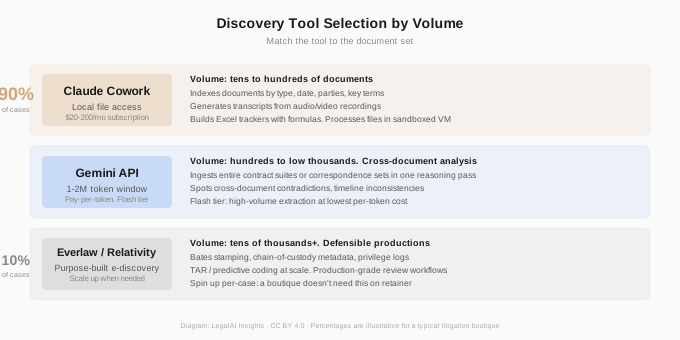
This is where Cowork’s file-access model pays off most visibly. Instead of uploading documents into a chat window one at a time, you point Cowork at your discovery folder — hundreds or thousands of files — and describe what you need.
A criminal defense firm that inherited a case mid-stream used this approach to process a massive government production: Cowork indexed every document by type, date, and parties; generated draft transcripts of dozens of recorded jail calls using tools on the attorney’s own machine; and cross-referenced the indictment against the production to flag evidence relevant to the specific charges against their client. The setup took minutes. The output would have consumed well over a hundred hours of manual work.
Cowork is not an e-discovery platform. It doesn’t produce Bates-stamped, defensible productions. It doesn’t maintain chain-of-custody metadata. It doesn’t integrate with Relativity or Everlaw. For document-intensive litigation, Cowork is a triage and analysis layer that sits alongside your e-discovery tools, not a replacement. But for the boutique handling a few hundred to a few thousand documents — where the alternative is a paralegal with a spreadsheet — Cowork compresses days of indexing into hours.
For larger volumes, consider pairing Cowork with Google’s Gemini models via the API. Cowork processes files one at a time or in small batches through Claude; Gemini’s context window — up to one million tokens on Gemini 2.5 Pro, with two million available on some configurations — can ingest an entire contract suite or hundreds of pages of correspondence in a single reasoning pass. That matters when you need the model to spot cross-document patterns: a representation in an email that contradicts a term sheet, or a timeline inconsistency across five witness statements. Gemini’s Flash tier is also significantly cheaper for high-volume extraction tasks (as covered in our pricing analysis). The practical workflow is Cowork for file-system automation and document production, Gemini via the API for bulk analytical passes across large document sets — the model routing approach we outlined in our earlier post.
And when a case genuinely demands heavy e-discovery — tens of thousands of documents, defensible review workflows, production-grade chain of custody — you can always scale up to Everlaw or Relativity for that matter and pay for what the case requires. A boutique doesn’t need an enterprise e-discovery platform on retainer. It needs the ability to spin one up when a document-intensive case lands. Cowork and Gemini handle the 90% of cases where a few hundred to a few thousand documents need triage. Purpose-built platforms handle the other 10%.
Briefing: Where Connectors and Skills Combine #
Filing preparation is where connectors and skills earn their keep. Cowork’s connectors let Claude work inside Word, Excel, and PowerPoint directly — manipulating documents within the actual application, with formatting, field codes, and formulas intact. Skills package a tested workflow so it runs consistently. Together, they automate the formatting grind that accompanies every filing: tables of contents, tables of authorities, pagination checks, exhibit lists, and certificate-of-service blocks. One firm packaged its entire brief-finalization process as a reusable skill — after iterating until the output was reliable, anyone on the team can invoke it as a single command.
The hallucination risk remains real for any AI-generated substantive content. In a 2025 copyright case involving Anthropic, a Latham & Watkins attorney used Claude to format a reference and submitted a brief containing a fabricated citation, drawing a rebuke from the magistrate judge. Cowork is strong at processing citations that already exist in a brief — formatting, indexing, generating reference tables. It is unreliable at generating citations from scratch. Every cite in AI-drafted text needs verification against Westlaw or Lexis before filing.
Depositions and Witness Interviews: Summaries That Build on Themselves #
Deposition transcripts are long, repetitive, and full of material that matters only if you can find it later. Cowork can process a folder of transcripts and produce chronological summaries organized by topic, witness, or event — the kind of work product that used to require a junior associate’s weekend.
But the real utility comes from persistent memory. Within a Cowork Project — a persistent workspace with its own files, instructions, and memory — Claude remembers what happened in previous sessions. You set up a Project for a specific case, give it standing instructions about your theory, the key witnesses, and the issues you’re tracking, and it carries that context forward.
When a second deposition transcript arrives, you don’t re-explain the case. You drop the new transcript into the project folder and ask Cowork to update the existing analysis. It knows what the prior witnesses said, what themes you’re tracking, and where the new testimony confirms or contradicts the existing record. Each deposition adds to a cumulative working file rather than starting a fresh analysis from scratch.
Memory is scoped to individual projects — what Claude learns about one case doesn’t leak into another, which is the right design for a law firm. But memory is also local to your machine with no cloud sync, so you can’t access the same project from two computers. Team sharing for Cowork projects isn’t available yet.
Trial Prep: Where Everything Compounds #
This is where Cowork’s features stop being individually useful and start functioning as a system. A case project with persistent memory — already tracking the discovery index, deposition summaries, and key evidence — becomes the foundation for the documents a trial lawyer actually needs.
Opening statement drafts. An opening statement is a narrative built from facts scattered across depositions, documents, and expert reports. Cowork can pull from the case project’s accumulated analysis to generate a structured first draft that threads the chronology, identifies the strongest evidence for each element, and organizes the story around the themes you’ve been tracking since discovery. The draft will need substantial revision — tone, emphasis, and courtroom rhythm are things no AI gets right — but the assembly work, connecting forty exhibits and six depositions into a coherent narrative arc, is exactly the kind of synthesis Cowork handles well.
Witness examination outlines. For each witness, Cowork can produce a direct examination outline that maps each question to the supporting exhibit or prior testimony, with page-and-line citations from the transcripts already in the project folder. For cross-examination, it can identify contradictions between a witness’s deposition testimony and other evidence in the case file — the kind of impeachment material that takes hours to compile manually across thousands of pages. The outlines need attorney judgment on sequencing, emphasis, and what to leave out. But having every potential impeachment point already located and organized, with citations verified against the source documents, eliminates the mechanical work and lets the trial lawyer focus on strategy.
Exhibit organization. Cowork can read through your exhibit list and the underlying documents, then generate an exhibit reference guide — a document linking each exhibit number to a summary of what it shows, which witnesses it relates to, and where in the deposition transcripts it was discussed. For a case with two hundred exhibits, this is a paralegal’s full day of work. Cowork can deliver a first draft in a fraction of that time, leaving the paralegal to verify and refine rather than build from scratch.
The criminal defense case from the opening illustrates how this compounds over a matter’s lifecycle. The same Cowork Project that indexed discovery, summarized depositions, and tracked charge-specific evidence now holds enough context to generate first-pass trial documents that are grounded in the actual record — not hallucinated from training data.
The power isn’t any single feature. It’s that file access, skills, scheduled tasks, and persistent memory compound. A skill that runs on a schedule inside a project with memory is a workflow engine, not a chatbot.
The Legal Plugin #
When Anthropic released a legal plugin for Cowork on February 2, 2026, the market reaction was wildly disproportionate to what the plugin actually does. Thomson Reuters dropped 16%. RELX (LexisNexis’s parent) fell 14%. Wolters Kluwer lost 13%. LegalZoom cratered nearly 20%. Jefferies dubbed it the “SaaSpocalypse.” Combined losses across legal tech and data stocks exceeded $285 billion in the five trading days that followed.
The plugin itself is more modest than the headlines suggested. It’s a free, open-source set of structured prompts and workflow maps — not a new model, not a legal database, not a Westlaw competitor. It provides five slash commands (/review-contract, /triage-nda, /vendor-check, /brief, /respond) configured against a local playbook file where you define your firm’s standard positions, acceptable ranges, and escalation triggers. /review-contract scans agreements clause by clause and flags each as green, yellow, or red against your playbook. /triage-nda classifies incoming NDAs for standard approval, counsel review, or full review. /brief generates contextual briefings from your case materials. As Reed Smith’s analysis noted, the plugin tells Claude how to think through legal problems in a particular sequence — it doesn’t give Claude legal knowledge it didn’t already have.
The market panic missed a critical distinction: the plugin targets contract administration and compliance workflows, not legal research. Thomson Reuters’s moat is Westlaw’s curated case law database; RELX’s is LexisNexis. The plugin can’t search either one. As Artificial Lawyer observed, the sell-off was irrational — it conflated “legal AI” with “legal research” and punished companies whose actual product moats were untouched. Both Thomson Reuters and LexisNexis have since integrated with Anthropic’s platform rather than competing against it, and their stocks have partially recovered.
What matters more for litigation boutiques is the emerging ecosystem around the plugin. DeepJudge built an MCP connector that lets Cowork search a firm’s own prior matters and work product, then feed the results back into Claude for further analysis. Midpage integrated its legal research tools with Cowork, adding verified case law citation to the plugin’s workflow capabilities. Pramata connected its contract intelligence platform. These integrations matter because they address the plugin’s biggest gap — it doesn’t know your firm’s precedents, your jurisdiction’s case law, or your existing contract portfolio. Third-party connectors bring that context in.
For a pure litigation shop, the contract-review commands are less relevant than the /brief command and Cowork’s general capabilities. But for boutiques that also handle transactional work — vendor agreements, engagement letters, subcontractor terms — the plugin provides a structured first-pass review that would otherwise fall to a junior associate. Anthropic advises against using it for high-stakes or regulated legal work in its current form. All outputs require attorney review.
What Cowork Can’t Do #
Three limitations worth stating plainly.
No legal research database. Cowork can search the open web but has no access to Westlaw, Lexis, or any proprietary legal database. It can’t verify whether a case citation exists. Pair it with a research tool like Midpage or your existing Westlaw subscription for anything citation-dependent.
No audit trail for regulated work. Cowork activity is not currently captured in audit logs, the Compliance API, or data exports. OpenTelemetry monitoring is available for Team and Enterprise plans but is explicitly not a replacement for audit logging. Don’t use Cowork for workflows that require a defensible compliance record.
Usage limits are real. On Team plans, usage is pooled across seats. Enterprise plans offer custom capacity. A complex Cowork session consumes significantly more quota than regular chat, so budget accordingly — heavy users running Cowork on large case folders daily will need capacity well beyond the base allocation.
Getting Started #
Start with low-risk tasks on your Enterprise or Team plan — reorganize a folder of CLE materials, build a spreadsheet from a year of firm expenses, run Cowork on a closed matter where you already know what the analysis should look like. Build judgment on tasks where the downside of an error is time lost, not malpractice exposure: document indexing, timeline construction, deposition summary drafts, filing preparation. Brief drafting and legal research are where the verification burden is highest.
When you’re ready for client work, move to a Team or Enterprise plan. Configure role-based access controls, enable OpenTelemetry, and document your firm’s AI use policy — including the Heppner-informed requirement that counsel direct the AI-assisted work.
Every major AI company — Microsoft, Google, OpenAI — is building toward the same destination: an agent that uses your computer to complete real work. Cowork is ahead of the pack for non-developers right now, not because the model is smarter, but because the interface is simpler. The firms that start building skills and judgment now will capture the full value as the tools mature.
Further Reading #
- Claude Cowork product page. Anthropic’s overview of features and use cases.
- Get started with Claude Cowork. Anthropic’s official setup and usage guide.
- Using Cowork safely. Risk guidance on prompt injection, file access, and browser integration.
- Organize your tasks with projects in Cowork. How persistent memory and projects work.
- Cowork for Team and Enterprise plans. Admin controls, OpenTelemetry, and deployment guidance.
- Claude Legal Plugin. The free legal workflow plugin. Source code on GitHub.
- United States v. Heppner. Harvard Law Review analysis of the privilege ruling.
- Heppner and Gilbarco: Courts Apply Privilege to Generative AI. Perkins Coie’s practitioner analysis.
- Using AI Without Waiving Privilege. McDermott Will & Emery’s operational guidance.
- Claude Legal Is Here, and It’s Worth a Closer Look. Nicole Black’s practitioner review on LLRX.
- Anthropic’s Legal Plugin May Be the Opening Salvo. Bob Ambrogi’s analysis on LawNext.
- LegalTech: SaaSpocalypse Now. Law Gazette’s overview of the market reaction and recovery.
- Claude Crash Impact on Thomson Reuters + LexisNexis is Irrational. Artificial Lawyer’s analysis of why the sell-off missed the point.
- DeepJudge’s CTO on Connecting to Claude Cowork. How third-party legal tools are integrating with the Cowork ecosystem.
- Introduction to Claude Cowork. Anthropic’s free training course.
This post is published on LegalAI Insights. It is intended for informational and educational purposes only and does not constitute legal advice. The privilege analysis in this post is a summary of published judicial opinions and commentary — not a substitute for analyzing the specific terms, jurisdiction, and facts applicable to your practice. AI capabilities, pricing, and features described here reflect publicly available information as of the publication date and are subject to rapid change. Cowork is generally available but some features remain in research preview. Laws and ethics rules governing AI use in legal practice vary by jurisdiction.