

AI Playbook: Building a Stack That Outguns Bigger Firms #
A BigLaw litigation group spends $200–500 per attorney per month on AI tools — Harvey for research and drafting, Westlaw with CoCounsel for verified citations, Everlaw for document review, Lex Machina for judge analytics. For a 50-attorney practice, that’s $120,000–$300,000 a year in AI tooling alone, before you count the Westlaw subscription or the e-discovery platform.
A five-attorney litigation boutique doesn’t have that budget. But it doesn’t need it.
The same foundation models powering Harvey and CoCounsel are available directly through Anthropic’s API and enterprise plans. Claude Enterprise provides the same flagship intelligence with contractual confidentiality commitments, zero-data-retention options, and SOC 2-aligned security controls. ABA Formal Opinion 512 (July 2024) requires lawyers using AI to understand how the technology handles confidential information and to take reasonable measures to protect it. After United States v. Heppner — covered in detail below — the enterprise tier isn’t a luxury. It’s how you meet that obligation.
The Boutique Litigation Stack #
That $200–500/month BigLaw stack bundles enterprise security, managed infrastructure, practice-specific fine-tuning, and vendor support. A boutique doesn’t need all of that.
Tier 1: The Foundation — Claude Enterprise ($30/seat/month) #
After Heppner, the first question for any litigator evaluating an AI tool is not “how smart is it?” It’s “will my work product stay privileged?”
Claude’s consumer tier — the free and Pro plans — operates under Anthropic’s standard privacy policy, which reserves the right to collect user data and disclose it to third parties. That’s the policy Judge Rakoff relied on when he stripped privilege from Heppner’s AI-generated defense documents. For a litigation boutique processing privileged case strategy, confidential witness prep, or attorney mental impressions, the consumer tier is off the table.
Claude Enterprise solves this. At $30 per seat per month (billed annually), it provides zero-data-retention guarantees, a commitment that inputs are never used for model training, SOC 2-aligned security controls, and admin-level access management. For five attorneys, that’s $1,800 per year — less than what a single BigLaw associate bills in two hours. The API at $5/$25 per million input/output tokens provides the same contractual protections: Anthropic’s API data policy states that inputs are not used for training by default.
With either Enterprise or the API, you get Claude’s full 200,000-token context window (up to 1 million tokens on the API) — enough to load an entire deposition transcript, a full appellate brief, or a set of contracts into a single conversation without chunking.
Heppner: Why Enterprise Isn’t Optional #
In February 2026, Judge Rakoff of the Southern District of New York ruled in United States v. Heppner that documents a criminal defendant created using the consumer version of Claude were protected by neither attorney-client privilege nor the work product doctrine.
The facts: Heppner, a financial executive facing securities fraud charges, used Claude’s consumer version on his own — without his lawyer’s direction — to prepare defense strategy documents. He input information he’d received from counsel, generated reports outlining potential arguments, and shared those outputs with his lawyers. When the government obtained his devices, Judge Rakoff granted access on three grounds: Claude is not an attorney, Anthropic’s consumer privacy policy permits data collection and disclosure to third parties (including government authorities), and Heppner wasn’t acting at counsel’s direction.
The ruling has drawn criticism for going further than necessary — particularly Judge Rakoff’s reliance on Anthropic’s terms of service to find no reasonable expectation of confidentiality. But it produces four concrete rules for any litigation boutique:
Use enterprise-grade tools for privileged work. Rakoff’s reasoning turned on Anthropic’s consumer privacy policy. Claude Enterprise and the API operate under different terms. O’Melveny’s analysis noted that enterprise AI tools “could at least arguably give rise to a reasonable expectation of confidentiality.”
Document counsel direction. Rakoff suggested the outcome might have differed if Heppner’s lawyer had directed him to use Claude — potentially bringing the AI tool within the Kovel doctrine as counsel’s agent. When you assign associates or paralegals to use AI on a matter, make that direction explicit and document it in the matter file.
Redact before uploading. Strip client-identifying information from documents before they go into any AI tool. Use placeholder names. Remove case numbers. This used to mean manual find-and-replace — tedious on a 200-page production. OpenAI Privacy Filter, released in April 2026 under an Apache 2.0 license, automates it. Privacy Filter is a 1.5-billion-parameter model that runs locally — on a laptop, no cloud required — and detects PII across eight categories: names, addresses, emails, phone numbers, URLs, dates, account numbers, and secrets (passwords, API keys). It handles up to 128,000 tokens in a single pass, enough for a full deposition transcript, and achieves a 96% F1 score on the PII-Masking-300k benchmark. Because it runs on-device, your unredacted documents never leave your machine — the PII is stripped before anything touches an API. OpenAI uses a fine-tuned version internally for its own privacy workflows. For a litigation boutique, this is a free preprocessing layer that turns “redact before uploading” from a manual chore into a one-command step: opf redact on a document, review the output, then upload the sanitized version to Claude or Gemini.
Establish a firm AI policy. 47 states now have formal AI ethics guidance, and ABA Opinion 512 requires competence in understanding how AI handles confidential information. A written policy covering approved tools, required confidentiality tiers, redaction procedures, and verification steps isn’t optional.
Tier 2: Legal Research — Westlaw or Lexis ($150–400/month per attorney) #
This is the one thing you cannot replace with a general-purpose LLM. Claude does not have access to live legal databases. It cannot Shepardize a case. It will occasionally hallucinate citations — producing case names that sound plausible but don’t exist. Every citation Claude produces must be verified against Westlaw, Lexis, or Fastcase before it goes into a filing.
You likely already have one of these subscriptions. The AI add-ons (CoCounsel for Westlaw, Lexis+ AI for Lexis) add value for firms that can afford them, but they’re not essential for a boutique that’s already using Claude for the analytical lifting. Use Claude to draft the argument and identify the legal theories. Use Westlaw or Lexis to find and verify the actual authorities.
Tier 3: Litigation Analytics and What You Don’t Need (Yet) #
Lex Machina provides judge analytics, opposing counsel track records, and case outcome predictions across federal courts — knowing that your judge grants motions to dismiss 73% of the time changes how you frame your brief. Pricing requires a sales call and can be steep for smaller firms, so it’s worth the investment only if your practice area (IP, employment, antitrust) justifies recurring use. For plaintiff-side boutiques, Darrow scans public data to identify potential class action and mass tort cases.
Harvey ($200–500/seat/month, enterprise only) is genuinely impressive and widely deployed across AmLaw 100 firms, but its pricing targets firms billing $800+ per hour across hundreds of attorneys.
Everlaw or Relativity (volume-based enterprise pricing) are overkill for a five-attorney shop’s typical caseload — but they’re not off the table. If a case lands with a million-document production and Claude’s API batching isn’t keeping up, you can spin up an Everlaw instance for that matter. The same goes for any tool in this stack: the point of building on APIs and per-seat subscriptions is that you’re never locked out of scaling up. You don’t need Everlaw on retainer to use it when the case demands it. For smaller discovery sets, Claude handles document batches via the API, and tools like Logikcull (now part of Reveal) offer more accessible pricing for mid-range volumes.
Model Routing: Claude Opus for the Brief, Gemini for the Document Stack #
The smartest boutique AI strategy isn’t picking one tool — it’s routing each task to the model that handles it best, while keeping everything inside enterprise-grade data protections.
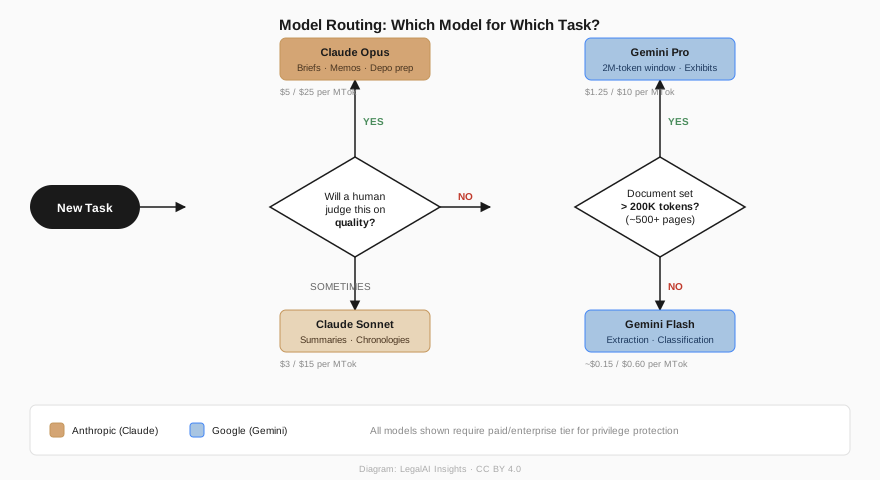
Claude Opus for drafting, reasoning, and strategy. Claude Opus 4.6 at $5/$25 per million tokens through the API (or within your Enterprise subscription) delivers the nuance, rhetorical precision, and analytical depth that high-stakes litigation demands. A Haiku-generated brief will hedge where a litigator should be direct. It will structure arguments in the order it encounters them, not the order that builds toward a conclusion. For anything a court or client will read, start with Opus.
Gemini for high-volume document review and long-context analysis. Google’s Gemini API offers two features that complement Claude: a context window that stretches to two million tokens on some models (enough to ingest an entire set of case exhibits in a single prompt), and aggressive pricing on its Flash tier. Gemini 2.5 Flash costs roughly $0.15/$0.60 per million input/output tokens — about 20x cheaper than Claude Opus for the same volume of text.
Critically, Google’s paid Gemini API and Gemini for Google Cloud provide enterprise-grade data protections: inputs are not used for model training, and data is handled under Google Cloud’s data processing addendum. If your firm already runs on Google Workspace, the Gemini Enterprise tier inherits those same protections. You get the confidentiality assurances a litigator needs without locking yourself into a single provider.
| Task | Best Model | Why |
|---|---|---|
| Draft a motion or brief | Claude Opus | Rhetorical precision, argument structure, tone control |
| Summarize a single deposition | Claude Opus or Sonnet | Strong reasoning on 100–200 page documents |
| Process 500 discovery docs (extract key terms) | Gemini Flash | 20x cheaper; structured extraction doesn’t need frontier reasoning |
| Ingest a full set of exhibits (1M+ tokens) | Gemini Pro | 2M-token context window holds the entire document set |
| Deposition prep (question generation) | Claude Opus | Strategic sequencing, anticipating evasive answers |
| First-pass document classification | Gemini Flash or Claude Haiku | Classification accuracy is comparable across tiers |
| Client-facing memo or letter | Claude Opus | Tone, judgment, and persuasive writing |
The rule of thumb: Claude Opus for anything a human will judge on quality. Gemini Flash for anything you’re judging on completeness at volume. A five-attorney firm processing a 300-document production might spend $0.50 on Gemini Flash for the extraction pass, then $2 on Claude Opus to draft the summary memo. Total cost: under $3. The same workflow through a single enterprise vendor would cost $15–50.
One caveat: if you’re routing privileged material through multiple providers, each provider needs its own data processing agreement and each needs to meet the Heppner standard — enterprise tier, no training on inputs, contractual confidentiality. The cost math only works when every model in your stack clears the privilege bar.
Prompt Engineering: The Boutique’s Real Edge #
Harvey’s team has spent thousands of hours tuning prompts for specific legal workflows. Those tuned prompts produce more reliable outputs than a raw “summarize this document” query. But for a boutique with a focused practice, custom prompts tuned to your specific case types — running inside Claude Enterprise where your data stays privileged — will outperform a general-purpose enterprise tool that tries to serve every practice area.
Example: Deposition Impeachment Prep #
You are a senior litigation attorney preparing for a follow-up
deposition of the corporate 30(b)(6) designee in a wrongful
termination case in the Northern District of California.

Review the transcript and identify:
1. The three weakest points in the witness's testimony on the
   company's progressive discipline policy
2. Internal contradictions within the testimony itself
3. Contradictions between this testimony and the employee handbook
   (uploaded separately)

For each weakness, provide:
- Exact page and line citations from the transcript
- The specific contradiction or vulnerability
- Three follow-up questions designed to impeach the witness

Output as a table with columns: Testimony (with Citations),
Vulnerability, and Proposed Questions.
Adapt the specifics — witness role, dispute type, jurisdiction, key issue — to your case. A generic “help me prepare for this deposition” produces generic results.
Example: Motion to Compel — First Draft #
You are a litigation attorney in the Eastern District of Texas
drafting a motion to compel discovery responses. The defendant has
served boilerplate objections to Interrogatories 4, 7, and 12
without producing any substantive responses, and has withheld 340
documents on a privilege log that lists only "attorney-client
privilege" without describing the documents.

Relevant procedural rules: Fed. R. Civ. P. 37(a), 26(b)(5)
Judge: [name] (tends to grant motions to compel when meet-and-
confer is well-documented — see attached order from prior case)

Draft a motion that:
1. States the procedural history of the discovery dispute
2. Addresses each category of deficient response
3. Argues why each objection fails under applicable law
4. Requests specific relief including fees under Rule 37(a)(5)

Use a direct, confident tone. Do not hedge. Flag any legal
propositions where you are uncertain of the controlling authority
with [VERIFY].
The [VERIFY] instruction is critical. It tells Claude to mark its own uncertainty rather than confidently citing a case that doesn’t exist.
Building a Prompt Library #
The real productivity gain is building a library of tested prompts for your recurring workflows. An employment litigation boutique might maintain templates for summarizing EEOC charge files, drafting position statements, analyzing comparator evidence, preparing Rule 30(b)(6) deposition outlines, and generating case chronologies from document productions. Each prompt gets refined as you learn what works for your specific document types and judges. Claude Projects lets you store case-specific context — uploaded pleadings, your brief bank, standing instructions about citation format and writing style — so you don’t rebuild context from scratch every session. One litigator described setting up project instructions that included rules like “only direct quotes from cases, no paraphrasing, include pinpoint citations” and “do not straw-man opposition’s arguments or overstate legal doctrine” — instructions that carried across every conversation in that case.
The Cost Math: Boutique vs. BigLaw #
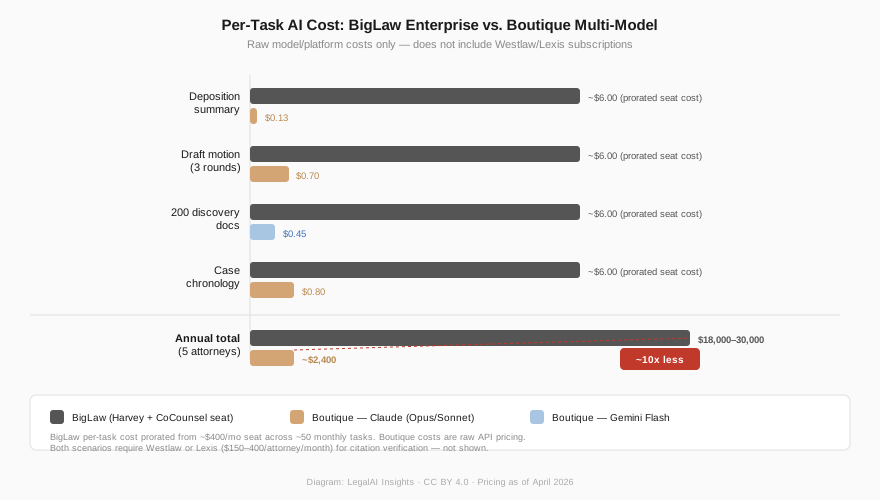
| Task | BigLaw (Harvey + Westlaw) | Boutique (Multi-Model API) |
|---|---|---|
| Summarize 1 deposition (100 pages) | Included in $300/mo seat | $0.13 (Claude Sonnet) |
| Draft motion to compel (with 3 rounds) | Included in $300/mo seat | $0.70 (Claude Opus) |
| Process 200 discovery docs (extract terms) | Included in $300/mo seat | $0.45 (Gemini Flash) |
| Build case chronology from 50 documents | Included in $300/mo seat | $0.80 (Claude Sonnet) |
| Monthly cost per attorney | $300–500 | ~$40 at moderate volume |
| Annual cost (5 attorneys) | $18,000–30,000 | ~$2,400 |
API costs: Claude Opus 4.6 at $5/$25, Claude Sonnet 4.6 at $3/$15, Gemini 2.5 Flash at ~$0.15/$0.60 per million tokens. Boutique API costs assume Claude Enterprise ($30/seat/month) as the base platform, with API usage on top for heavier workloads. BigLaw pricing includes verified citation databases (CoCounsel/Lexis+ AI) and e-discovery platforms not present in the boutique stack — Westlaw or Lexis ($150–400/attorney/month) is an additional cost for all boutique scenarios and is required for citation verification. All recommended tiers provide no-training-on-inputs guarantees.
The annual savings of $16,000–28,000 in AI tooling fund a part-time paralegal or a meaningful fraction of an associate hire. If each attorney saves four hours per week on routine tasks (the figure consistently reported by firms using structured AI workflows), a five-attorney firm recaptures over 1,000 billable hours annually.
The Verification Tax #
Those time savings assume you’re still checking the work. The 40–60% reduction in drafting time holds only if you spend 20–30 minutes verifying every citation against Westlaw or Lexis and confirming every legal proposition against controlling authority. Skip this step and you’re the next lawyer sanctioned for filing AI-generated hallucinations.
Claude will occasionally produce a case name that sounds right — correct parties, plausible citation, accurate-seeming holding — that doesn’t exist. It will sometimes mischaracterize a holding, stating a rule more broadly than the court did or omitting a critical limitation. These errors are undetectable without checking the source, because the surrounding analysis is coherent and well-reasoned.
For a five-attorney firm, this means building verification into the workflow, not bolting it on as an afterthought. Treat Claude’s output the way you’d treat a first draft from a summer associate: assume it’s directionally right, verify every authority, and rewrite anything you wouldn’t sign. The net time savings are real — checking a well-structured draft is faster than writing from scratch — but they’re 40–60%, not 90%.
Where to Start #
Get the data processing agreement right. Before anything else, confirm that Claude Enterprise’s DPA covers zero retention and no training on inputs. If you’re adding Gemini’s paid API, get that DPA too. Without it, your AI-assisted work product is a privilege waiver waiting to happen.
Write your AI policy. Cover approved tools, redaction requirements, citation verification procedures, documentation of counsel direction for AI-assisted work product, and client disclosure obligations under your state’s ethics rules. Heppner makes this non-negotiable.
Run a blind comparison. Pick a task you’ve already completed — a deposition summary, a contract risk memo, a set of interrogatory responses. Give the same inputs to Claude Enterprise. Compare the outputs without knowing which is which. Grade on factual accuracy, completeness, tone, and whether you’d send it after light editing. One hour of hands-on testing with your own documents tells you more than any vendor demo.
The litigation boutique’s advantage has never been budget. It’s been agility, specialization, and the willingness to try what works. AI amplifies it. The five-attorney firm that builds a disciplined AI practice today will outperform the 150-attorney firm that’s still waiting for the innovation committee to approve a pilot.
This is the first post in our AI Playbook series. Next: the in-house legal team — different constraints, different tools, and a very different cost calculus.
Further Reading #
- OpenAI Privacy Filter. Open-weight PII redaction model; runs locally, Apache 2.0 license. GitHub · Hugging Face.
- Anthropic API Documentation. Model specs, pricing, and legal summarization guide.
- Gemini API Documentation. Model specs, pricing, and context window details.
- Gemini for Google Cloud Data Governance. Google’s no-training commitment for paid API and enterprise tiers.
- ABA Formal Opinion 512. Ethical obligations for lawyers using AI (July 2024).
- United States v. Heppner — Harvard Law Review analysis of the SDNY privilege ruling.
- AI and Privilege After Heppner. Lawfare’s critique of the court’s reasoning.
- 8am 2026 Legal Industry Report. AI adoption statistics across firm sizes.
- Claude Projects for Legal Analysis. A litigator’s walkthrough of project-based AI workflows.
- Claude Legal Summarization Guide. Anthropic’s official documentation for legal document processing.
- LegalAI Insights: The Foundation. Our primer on foundation models, pricing, and benchmarks.
This post is part of the AI Playbook series on LegalAI Insights. It is intended for informational and educational purposes only and does not constitute legal advice. AI capabilities, pricing, and tool availability described here reflect publicly available information as of the publication date and are subject to rapid change. The cost estimates assume publicly available pricing as of April 2026; your actual costs will depend on volume, negotiated rates, and usage patterns. Laws governing AI use, attorney-client privilege, and professional responsibility vary by jurisdiction.